BetaBuy & sell · Guide
Start and operate a Mobazha store
Prepare a store that a buyer can understand, pay, and receive from through one tested journey.
Prepare your storeEstimated time6 minutes
Trust, applicability, and sourcesMobazha v0.3 release candidate
Start with the store journey
Understand the offer-to-fulfillment model→Separate product shape, merchandising, supply facts, accepted terms, and delivery evidence.Prepare the store→Validate identity, policy, fulfillment, and a complete test purchase.Apply to a community market→Follow the selected market's seller-entry, review, and catalog rules without transferring order authority.Publish listings→Show buyer-verifiable product, variant, price, and availability data.Maintain catalog supply→Restock tracked physical listings or import license codes and reconcile partial results.Configure shipping→Match destinations, rates, listings, estimates, and evidence.Prepare payments→Advertise only capabilities the backend and operator are ready to support.Operate orders→Reconcile payment, fulfill, refund, dispute, and complete safely.
Grow through disclosed distribution
A seller can use an attributed promoter relationship without moving the order or settlement truth into a second spreadsheet. This walkthrough shows one wallet-bound link, a real local-test-network payment, and the resulting on-chain promoter payout. Review the written payment and fee guidance before using the pattern.
The objects a Mobazha seller operates
| Object | Seller responsibility | Product boundary |
|---|---|---|
| Store / Node | Identity, policy, capabilities, orders, and business-state authority | This is not merely a visual storefront or a channel account. |
| Storefront | Brand, navigation, presentation, domain, and audience view | Several storefront or channel views may reuse store-owned commerce state where supported. |
| Listing revision | Buyer-visible promise: product shape, options, price, media, terms, and fulfillment eligibility | A later revision must not silently change an accepted quote or order. |
| Supply and availability | Whether a purchasable combination can actually be fulfilled | Inventory, provider supply, service capacity, and option labels are separate facts. |
| Collection and discount | Merchandising and price adjustment rules | They organize or transform an offer; they do not own order state. |
| Shipping profile | Destination eligibility, service, rate, estimate, and evidence requirements | A listing is not purchasable for a destination until a valid fulfillment path exists. |
| Payment capability | A backend-advertised and operator-ready payment path | A parsed Token or provider name alone is not readiness. |
| Order | Accepted terms, payment state, fulfillment obligation, recovery, and completion | The backend remains authoritative even when the order is presented in another channel. |
Before opening a store
- Choose self-hosted operation or an optional managed service.
- Configure payment methods supported by your backend and region.
- Publish delivery, return, refund, and dispute terms that buyers can inspect.
- Review the final quote and all recipient amounts before accepting an order.
What Mobazha does not decide for you
A seller remains responsible for product legality, tax, fulfillment, customer support, and any seller-defined charges. Mobazha provides commerce software and verifiable transaction flows; it does not make every operator one legal entity.
Store readiness checklist
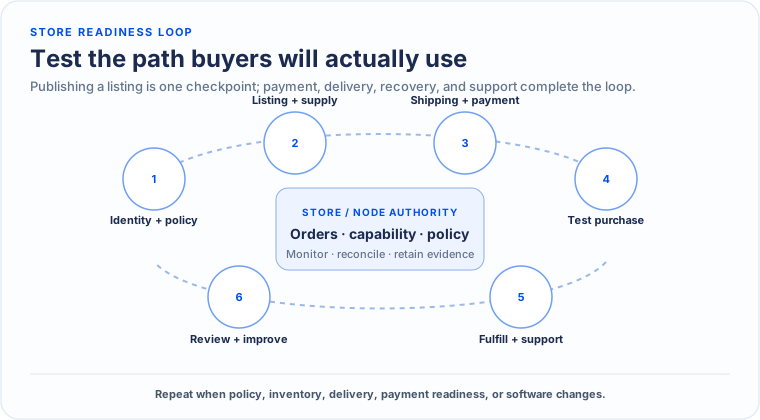
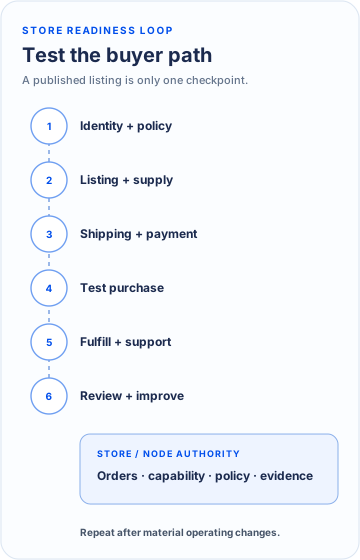
- Set a recognizable store identity, operator contact path, locale, currency display, and domain where applicable.
- Create complete listings with accurate variants, inventory or availability, media, price, and shipping eligibility.
- Configure shipping profiles, delivery estimates, return conditions, and fulfillment evidence before accepting orders.
- Enable only payment methods that the backend advertises and that the store is operationally ready to monitor and settle.
- Test the full buyer journey on the same deployment, capability set, and device classes customers will use.
Order operations
- Review the order, quote, payment state, buyer instructions, and fulfillment obligation before confirming.
- Do not infer payment completion from a screenshot, message, or Agent statement; use the backend's verified payment state.
- Record shipment or delivery evidence using the order flow rather than relying on an external chat alone.
- Handle cancellation, refund, dispute, and completion through the allowed state transition for the current order.
- Retain policy, quote, payment, fulfillment, and communication references needed for support or dispute review.